
Introduction
Process: A process is a program in execution. It differs from a program, which is a passive set of instructions, whereas a process is the active execution of those instructions. A process comprises both the program code and its current activity.
Process Operations: Process operations in an operating system encompass the management and lifecycle of processes, including creation, scheduling, execution, and termination.
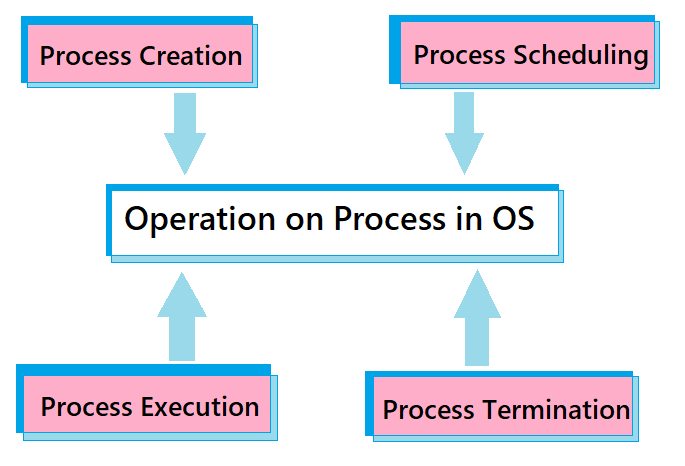
- Process Creation: Process creation refers to the generation of a new process, which is an instance of a program capable of executing independently. This involves several steps, such as allocating memory, setting up process control blocks (PCBs), and initializing various attributes necessary for the process to function.
- Process Scheduling: Scheduling is an essential function of the operating system that determines the order in which processes are granted CPU time. Once a process is ready to execute, it enters the "ready queue," where it waits for CPU allocation. The scheduler selects a process from this queue using a scheduling algorithm, such as First-Come, First-Served (FCFS), Shortest Job Next (SJN), Round Robin (RR), or Priority Scheduling.
- Process Execution: Process execution involves running the instructions of a program on the CPU. Upon creation, the process is loaded into memory and scheduled for execution. It transitions through various states, including ready, running, waiting, and terminated, depending on its activity and resource needs. The operating system manages these transitions and allocates CPU time accordingly. During execution, the CPU fetches, decodes, and executes the instructions, while input/output operations, inter-process communication, and system calls may require OS intervention to manage resources.
- Process Termination: Process termination marks the end of a process's execution. This can occur due to task completion, an error, or an explicit termination request. Upon termination, the operating system reclaims resources, updates process tables, and removes the process from the system's list. The OS may also notify dependent processes to ensure proper cleanup and maintain system stability.
Need for CPU Scheduling
CPU scheduling is a crucial function in an operating system, ensuring efficient and equitable allocation of the CPU among multiple processes.
As the CPU is a vital and limited resource, effective scheduling is essential for optimizing its usage.
The primary objectives of CPU scheduling are:
- Maximizing CPU Utilization: By keeping the CPU engaged as much as possible, scheduling enhances overall system efficiency and performance.
- Improving Throughput: Scheduling increases the number of processes completed within a given time, thus improving system throughput.
- Reducing Waiting Time: Efficient scheduling minimizes the time processes spend in the ready queue, leading to better responsiveness and user satisfaction.
- Balancing Load: Scheduling helps distribute the load evenly across multiple CPUs in multi-core systems, preventing bottlenecks and optimizing system performance.
Modes in CPU Scheduling:
Preemptive Scheduling
Non-Preemptive Scheduling
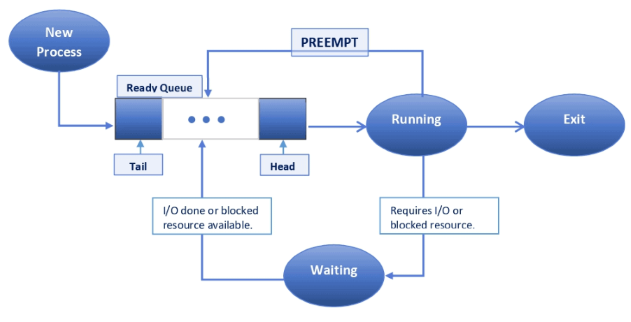
Preemptive scheduling enables the operating system to interrupt a running process and allocate the CPU to another process. Although more complex to implement than non-preemptive scheduling, it can enhance system performance and responsiveness by ensuring that high-priority or time-sensitive processes receive timely CPU access.
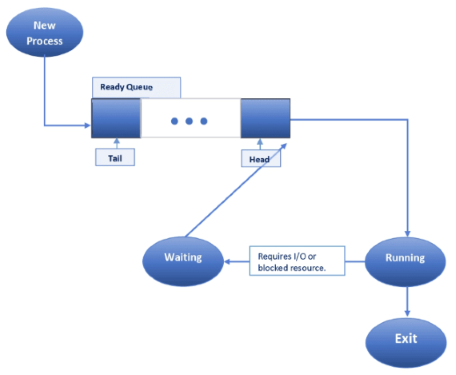
In non-preemptive scheduling, once a process begins execution, it continues until completion without interruption. This approach is simpler and incurs less overhead, but it can result in poor responsiveness, especially for time-sensitive tasks.
The basic terminologies used in CPU scheduling are as follows:-
- Process ID: The unique identifier assigned to each process, often represented by numbers or a 'P' followed by numbers, e.g., P0, P1, ..., Pn.
- Arrival Time (AT): The time when a process enters the ready queue, indicating when the process is ready to be executed by the CPU. Arrival Time is always a positive value or zero.
- Burst Time (BT): The time required for a process to complete its execution. The Burst Time of a process is always greater than zero.
- Completion Time (CT): The total time required for the CPU to complete a process, from the moment the process enters the ready queue until it finishes execution. Completion Time is always greater than zero.
- Turnaround Time (TAT): The total time taken from the submission of a process to its completion. It is calculated as:
Turnaround Time = Completion Time - Arrival Time - Waiting Time (WT): The total time a process spends in the ready queue waiting for CPU time. It is calculated as:
Waiting Time = Turnaround Time - Burst Time - Response Time (RT): The time from submission of a request until the first response is produced, excluding output (particularly important in time-sharing systems).
- Ready Queue: The queue where all processes are stored while waiting for the CPU to execute them. This queue helps organize the processes and prevent conflicts during execution.
- Gantt Chart: A visual representation of process execution, showing the timeline of completed processes. It is useful for calculating metrics such as Waiting Time, Completion Time, and Turnaround Time.
- Throughput: The number of processes that complete their execution per unit of time, reflecting the system's efficiency in handling processes.
Types of CPU Scheduling Algorithms:
First-Come, First-Served (FCFS): In this scheduling method, processes are executed in the order they arrive in the ready queue.
- Minimizes average waiting time.
- Efficient for batch processing.
- Difficult to predict the burst time of processes.
- Can lead to starvation of longer processes.
Shortest Job Next (SJN) / Shortest Job First (SJF): This scheduling algorithm selects the process with the shortest burst time for execution. By prioritizing processes that require the least CPU time, it aims to minimize waiting time and improve overall system efficiency. However, it can be difficult to implement in practice, as it requires knowing or estimating the burst time of each process in advance.
- Simple to implement and understand.
- No starvation: every process gets its turn.
- Can lead to the convoy effect, where shorter processes wait for a long process to complete.
- Poor average waiting time for a mix of short and long processes.
Round Robin (RR): In this scheduling algorithm, each process is assigned a fixed time slice, or quantum, and is executed in a cyclic order. Once a process completes its time slice, it is placed back in the ready queue, allowing the next process to execute. This approach ensures fair CPU allocation among processes and improves responsiveness, especially in time-sharing systems. However, the choice of time slice is critical, as too small a quantum can lead to excessive context switching, while too large a quantum may reduce the system's responsiveness.
- Fairness: Each process gets equal CPU time.
- Good for time-sharing systems.
- Performance depends on the length of the time quantum.
- High context switching overhead if the time quantum is too small.
Priority Scheduling: Priority scheduling is a method where processes are assigned priorities, and the process with the highest priority is selected for execution. Priority can be based on various factors such as importance, resource requirements, or user-defined criteria. Priority scheduling can be implemented in two ways: non-preemptive and preemptive
Non-Preemptive Priority Scheduling: In this scheduling, once a process begins its execution, it runs to completion or until it voluntarily relinquishes the CPU, such as when waiting for I/O operations. A new process with a higher priority does not interrupt the currently running process, meaning the running process continues until it either finishes or blocks itself, regardless of the arrival of higher-priority processes.
- Simple to implement.
- No additional overhead from context switching during process execution.
- Lower priority processes can experience significant delays if there are many higher priority processes.
- Can lead to starvation of low-priority processes if higher-priority processes keep arriving.
Preemptive Priority Scheduling: In this scheduling, a running process can be interrupted if a new process with a higher priority arrives. The higher-priority process preempts the current process, which is then moved back to the ready queue.
- High responsiveness: High-priority processes get CPU time as soon as they arrive.
- Better suited for real-time systems where urgent tasks need immediate attention.
- Higher complexity due to the need to handle preemptions and context switches.
- Increased overhead from frequent context switches.
The FCFS algorithm is non-preemptive, meaning once CPU time is allocated to a process, other processes must wait until the current process finishes its execution. This characteristic can lead to the Convoy Effect, a situation where a CPU-intensive process with a large burst time occupies the CPU, causing delays for other processes with smaller burst times. These smaller processes, often I/O-bound, are forced to wait for the long-running process to complete, reducing overall system efficiency.
Example: Consider the following six processes with the arrival time and CPU burst time given in milliseconds:
| Process ID | Arrival Time (ms) | Burst Time (ms) |
|---|---|---|
| P1 | 0 | 9 |
| P2 | 1 | 3 |
| P3 | 1 | 2 |
| P4 | 1 | 4 |
| P5 | 2 | 3 |
| P6 | 3 | 2 |

Execution Order: P1 -> P2 -> P3 -> P4 -> P5 -> P6
Advantages:
Disadvantages:
Example: Consider the following five processes with the arrival time and CPU burst time given in milliseconds:
| Process ID | Arrival Time (ms) | Burst Time (ms) |
|---|---|---|
| P1 | 1 | 7 |
| P2 | 3 | 3 |
| P3 | 6 | 2 |
| P4 | 7 | 10 |
| P5 | 9 | 8 |
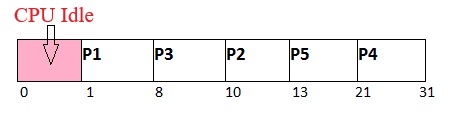
Execution Order: P1 -> P3 -> P2 -> P5 -> P4
Advantages:
Disadvantages:
Example: Consider the following six processes with the arrival time and CPU burst time given in milliseconds:
| Process ID | Arrival Time (ms) | Burst Time (ms) |
|---|---|---|
| P1 | 0 | 5 |
| P2 | 1 | 6 |
| P3 | 2 | 3 |
| P4 | 3 | 1 |
| P5 | 4 | 5 |
| P6 | 6 | 4 |
| Time Quantum: 4 ms | ||

Execution Order: P1 -> P2 -> P3 -> P4 -> P5 -> P1 -> P6 -> P2 -> P5
Advantages:
Disadvantages:
Example: Consider the following seven processes, with their priorities, arrival time and CPU burst time given in milliseconds:
| Process ID | Priority (lower is higher) | Arrival Time (ms) | Burst Time (ms) |
|---|---|---|---|
| P1 | 2 | 0 | 3 |
| P2 | 6 | 2 | 5 |
| P3 | 3 | 1 | 4 |
| P4 | 5 | 4 | 2 |
| P5 | 7 | 6 | 9 |
| P6 | 4 | 5 | 4 |
| P7 | 10 | 7 | 10 |

Execution Order: P1 -> P3 -> P6 -> P4 -> P2 -> P5 -> P7
Advantages:
Disadvantages:
Example: Consider the following seven processes, with their priorities, arrival time and CPU burst time given in milliseconds:
| Process ID | Priority (lower is higher) | Arrival Time (ms) | Burst Time (ms) |
|---|---|---|---|
| P1 | 2 | 0 | 1 |
| P2 | 6 | 1 | 7 |
| P3 | 3 | 2 | 3 |
| P4 | 5 | 3 | 6 |
| P5 | 4 | 4 | 5 |
| P6 | 10 | 5 | 15 |
| P7 | 9 | 15 | 8 |

Execution Order: P1 -> P2 -> P3 -> P5 -> P4 -> P2 -> P7 -> P6
Advantages:
Disadvantages:
Applications
Time-Sharing Systems: Ensures fair CPU allocation among multiple users for improved system responsiveness.
Real-Time Systems: Manages critical tasks to meet strict timing constraints and deadlines.
Web Servers: Efficiently handles multiple incoming requests to minimize response times.
Multi-core Processors:Distributes threads across cores to enhance parallelism and performance.