
Introduction
Segmentation subdivides an image into its constituent regions or objects until the objects of interest in an
application have been objects, until the objects of interest in an application have been isolated.
This process involves dividing the image into smaller segments that have a certain set of rules.
This technique employs an algorithm that divides the image into several components with common pixel characteristics.
The process looks out for chunks of segments within the image.
Small segments can include similar pixels from neighboring pixels and subsequently grow in size.
The algorithm can pick up the gray level from surrounding pixels.
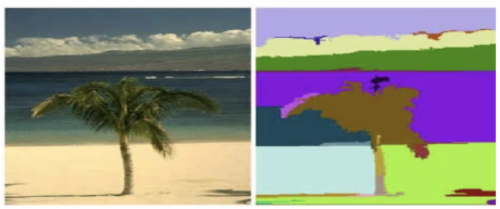
Region Growing Segmentation
Region-growing methods rely mainly on the assumption that the neighboring pixels within one region have similar values. The common procedure is to compare one pixel with its neighbors. If a similarity criterion is satisfied, the pixel can be set to belong to the cluster as one or more of its neighbors. The selection of the similarity criterion is significant, and the results are influenced by noise in all instances.
This method takes a set of seeds as input along with the image. The seeds mark each of the objects to be segmented. The regions are iteratively grown by comparison of all unallocated neighboring pixels to the regions. The difference between a pixel’s intensity value and the region’s mean are used as a measure of similarity. The pixel with the smallest difference measured in this way is assigned to the respective region. This process continues until all pixels are assigned to a region. Because seeded region growing requires seeds as additional input, the segmentation results are dependent on the choice of seeds, and noise in the image can cause the seeds to be poorly placed.
Fig. 2 (a) with seed marks (b) smallest region growing (c) expanded region growing Algorithm Steps
- Seed Point Selection
Seed points can be selected manually or automatically using methods like edge detection, corner detection, or region-based statistics. The choice of seed points significantly affects the final segmentation result. - Defining the Similarity Criteria
A similarity measure must be defined to determine whether a pixel is "similar enough" to be included in a region. Common criteria include:- Absolute intensity difference: |I_neighbor - I_seed| < T
- Euclidean distance in color space
- Texture similarity
- Region Growing Process
The algorithm begins with the seed and checks all neighbouring pixels. If a neighbouring pixel satisfies the similarity condition, it is included in the region, and its own neighbours are checked in the next iteration. The region grows outward until no more pixels meet the criteria. - Stopping Condition
The process stops when:- No further pixels meet the inclusion criteria.
- A maximum region size is reached.
- All pixels in the image have been classified. All pixels in the image have been classified.
- Seed Point Selection
-
Region Splitting Segmentation
Region splitting is an important approach to image segmentation that systematically divides an image into smaller regions to identify homogeneous areas based on certain criteria, such as intensity, color, or texture. This technique is commonly used in image analysis tasks where identifying uniform regions is essential for further processing or object recognition.
The main idea behind region splitting is to start with the entire image as a single region and progressively split it into smaller subregions. This division continues recursively until all resulting regions satisfy a predefined homogeneity condition. The process is often implemented using a quadtree data structure, where each non-homogeneous region is split into four equal quadrants. This method is particularly effective for images that contain large uniform areas and works well in scenarios where boundary detection is difficult using edge-based methods.Algorithm Steps
- Initialization: Begin by considering the whole image as a single region.
- Homogeneity Test: Evaluate whether the current region satisfies a given homogeneity criterion. Common criteria include intensity variance, range of pixel values, or texture similarity.
- Splitting: If the region is found to be non-homogeneous, it is divided into four smaller rectangular subregions (typically equal in size).
- Recursion: Apply the same homogeneity test to each of the newly created subregions. Continue this process recursively for every non-homogeneous region.
- Termination: The splitting process stops when all regions are homogeneous, or a minimum region size is reached.
- Optional Merging: Sometimes, a post-processing step is applied to merge adjacent regions that are similar, to reduce over-segmentation.
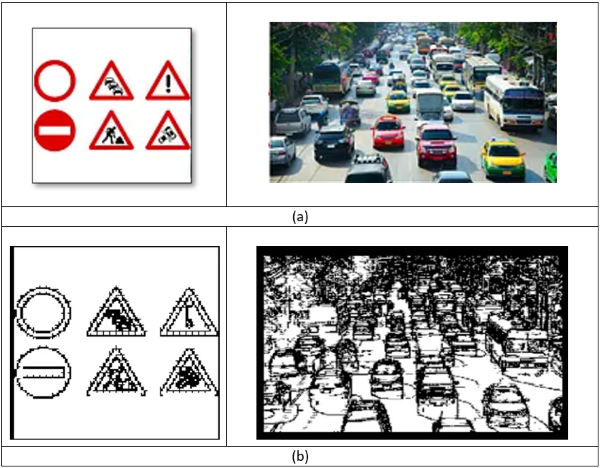
Fig. 3 (a) Original Image (b) Region splitting segmented Image -
Region Merging
Region merging is an image segmentation technique that follows a bottom-up approach to segment an image into regions based on pixel similarity. Unlike region growing, which starts from individual seed points, region merging begins by over-segmenting the image into small, homogeneous regions and then merges adjacent regions that meet certain similarity criteria. This technique is effective for obtaining large and meaningful regions while minimizing the impact of noise and irrelevant details.
In region merging, the image is first divided into several small regions (often based on pixel intensity or color). These initial regions, known as super pixels, serve as the basic units for merging. The algorithm then evaluates the similarity between neighbouring super pixels and merges them into larger regions if they meet predefined similarity criteria, such as intensity, color, or texture. The process continues iteratively, merging the regions that are most like each other, until the entire image is segmented into a set of final regions. The success of region merging depends on the selection of initial super pixels, the similarity threshold, and the merging strategy.Algorithm Steps
- Initialization: Begin by considering the whole image as a single region.
- Initial Super pixel Generation
The first step in region merging is to divide the image into small regions or super pixels. Various methods, such as SLIC (Simple Linear Iterative Clustering) or k-means clustering, are commonly used to generate these initial super pixels. Each super pixel represents a relatively homogeneous region of the image. - Similarity Measurement
A similarity measure is defined to assess how closely two neighboring regions (superpixels) match. The similarity criteria may be based on:- Intensity difference: Differences in pixel intensities between adjacent regions.
- Color similarity: Using color spaces like RGB or HSV to measure the distance between regions.
- Texture similarity: Measures based on texture features, such as entropy or contrast.
- Region Merging Process Starting with the initial set of superpixels, the algorithm compares adjacent regions and merges them if their similarity exceeds a predefined threshold. The merging process continues iteratively, considering neighboring regions until no more regions can be merged.
- Stopping Condition The algorithm stops when:
- No neighboring regions meet the similarity threshold.
- A maximum number of regions is reached.
- The desired segmentation granularity is achieved.
Applications
- Medical imaging, for identifying homogeneous tissues or pathological regions.
- Remote sensing, where different land cover types need to be segmented based on spectral similarity.
- Industrial inspection, for detecting defects or irregularities on surfaces.
-
Watershed Image Segmentation
Watershed image segmentation is a powerful technique used in image processing to partition an image into distinct regions based on the landscape analogy of a watershed. The watershed algorithm treats an image as a topographic surface where light pixels represent peaks and dark pixels represent valleys. By simulating a flooding process, the image is divided into regions based on the catchment basins formed by the water flow. It is widely used for separating overlapping objects and detecting boundaries in images.
The watershed algorithm is inspired by the concept of water flowing in a landscape. In this context:- Peaks in the image are considered the highest points (bright regions).
- Valleys or basins are the darkest regions where water would accumulate.
- The algorithm simulates the flooding of the image from the lowest point, progressively filling basins while merging neighboring basins until no more merging is possible.
The watershed line is the boundary between adjacent basins, and these lines are used to define the segmented regions.
Below we will see an example on how to use the Distance Transform along with watershed to segment mutually touching objects.
Consider the coins image below, the coins are touching each other. Even if you threshold it, it will be touching each other.Applying the Watershed Algorithm
Once markers are assigned:
- The watershed algorithm is applied to the original image using the marker labels.
- The flooding begins from the marker positions.
- As the water levels rise, regions expand until they meet at object boundaries.
- These boundaries are marked with -1 in the marker image.
The final output clearly segments individual objects, even when they are touching or overlapping.
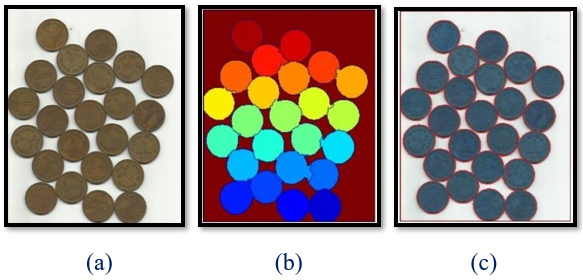
Fig. 4 (a) Original Image (b) Marker Image (c) Watershed Output Image