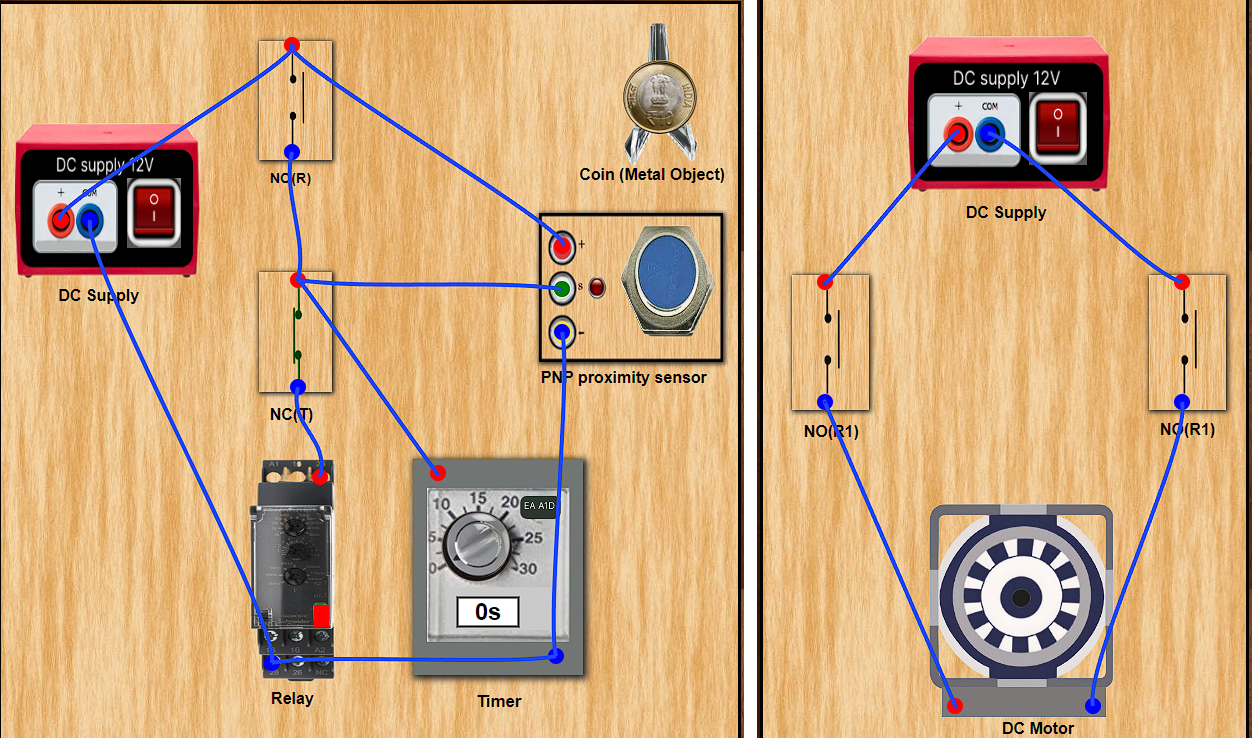
Procedure
Step 1 : Click on the Control Circuit button in Control Circuit Section.
Step 2 : Get the required components in Control Circuit Section by clicking on components displayed in Components Section.
Step 3 : Establish the connections according to the control circuit diagram provided.
Step 4 : Verify the control circuit by clicking on the Check Connections 1 button.
Step 5 : If Wrong Connections then click on Delete Connections 1 button to delete connections and make the right connections.
Step 6 : Once the Control Circuit is verified, switch to the Power Circuit Section , Choose between AC Load & DC Load.
Step 7 : Get the required components in Power Circuit Section by clicking on components displayed in Components Section.
Step 8 : Make the connections according to the Power Circuit diagram provided.
Step 9 : Click on the Check Connections 2 button to validate the Power Circuit.
Step 10 :. If Wrong Connections then click on Delete Connections 2 button to delete connections and make the right connections.
Step 11 :. Once the Power Circuit is verified, switch On the Power Supplies.
Step 12 :. Now set the Timer value (between 1-30sec) by rotating the timer knob.
Step 13 :. Then drag the Coin on the PNP proximity sensor to start the motor with timer countdown (motor stops when countdown ends).
Step 14 :. Click on the Print button to get a print of the webpage.
Step 15 : Click on the Reset button to refresh the webpage.