Step 1: Set Up Memory Unit(RAM):
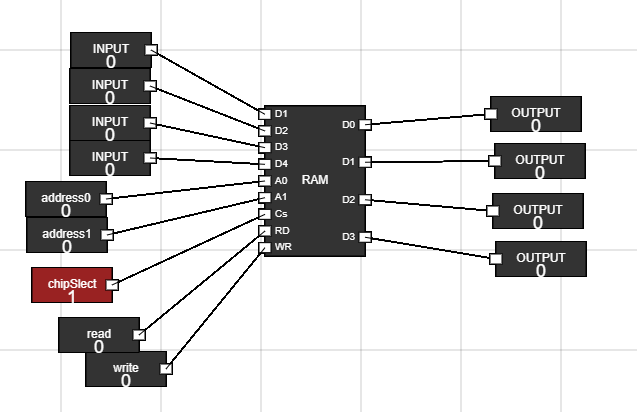
Navigate to the Components section and get 9 input button and 4 output to the
workspace. Figure 1: RAM, input and output on workspace
Step 2: Connect inputs to RAM and outputs from RAM. Rename the inputs :
- To reaname the input, hover over that input and click CTRL + A.
- Rename the inputs to d1,d2,d3 and d4 to give the 4-bit input to RAM.
- Rename the other 3 inputs to CS, Read and Write.
- Rename the last 2 inputs to a0 and a1 to provide the address at which read or write operation is performed.
- Connect the inputs to RAM. Make sure to keep CS signal high(1) as it activates RAM when it is low(0).
- Connect the output nodes of RAM to the four outputs. Figure 2: Connections of RAM
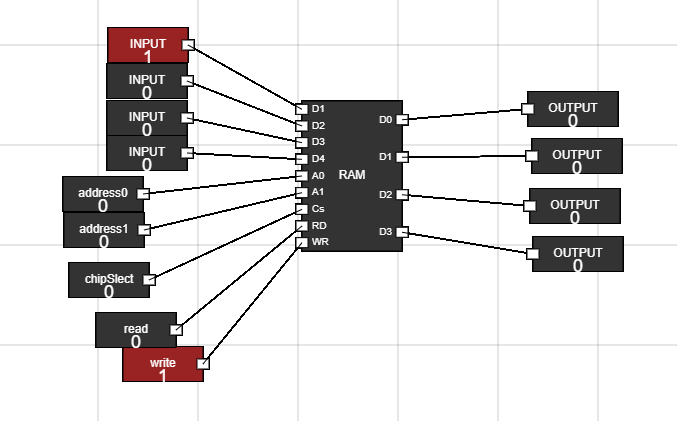
Step 3: Write Data into RAM :
- Change the input data i.e, d1,d2,d3 and d4 to whatever value you want to add to RAM.
- Change the address input to where you want to store data eg. 00, 01, 10 or 11.
- Activate the RAM by making CS low(0).
- Make the write input of RAM high(1).
- Close the CS. Now change the data and address and then again make the CSlow (0) to write the data.
- Now do the same to change data at other address locations i.e, at 00, 01, 10 and 11 address locations Figure 3: Write data to RAM
Step 4: Read Data from RAM :
- Activate the RAM by making CS low(0).
- Change the address input from where you want to read data.
- Make the read input of RAM high(1).
- You can see the data into output fields.
- Now do the same to read data from other address locations i.e, at 00, 01, 10 and 11 address locations Figure 4: Read data from RAM
Understanding Data Read and Write Operations in Random Access Memory